Press kit
Clip for Windows
All assets, blurbs, and contact details for journalists and content creators.
Product description blurbs
Click any blurb to select all text for copying.
Short (1 sentence)
Clip is a floating Windows tray that catches every screenshot and download the moment it lands, so you can drag it into any app in under three seconds.
Medium (1 paragraph)
Clip is a lightweight Windows utility that watches your Screenshots and Downloads folders in real time. The moment a new file lands, a thumbnail appears in a frameless floating tray that sits above every other window. From there, dragging the file into Outlook, VS Code, Teams, Jira, or any app that accepts files takes one motion - no folder hunting, no clipboard workarounds, no upload dialogs. At £14.99 as a one-time purchase, Clip ships with all v1.x updates included.
Long (3 paragraphs)
Every screenshot you take disappears into a timestamped folder the moment Windows saves it. Every file you download joins a growing pile in a Downloads folder you'll have to excavate later. Clip solves both problems at once with a floating, always-on-top thumbnail tray that surfaces the files you care about the moment they exist - no hunting, no context switching.
Built for developers and knowledge workers who live inside tools like VS Code, Outlook, Jira, and Teams, Clip intercepts new screenshots and downloads the moment they land on disk. A compact tray slides into view at the bottom of the screen, showing thumbnails of the most recent captures. A single drag from the tray to any app delivers a real file - not a clipboard paste, not a screenshot that needs to be saved and re-opened, but the actual image or document as a properly typed file attachment.
Clip is built on Electron, EV code-signed by Bit-Soft Technology Ltd (verified publisher shown by Windows), and sold as a one-time purchase at £14.99 with all future v1.x updates included. Download, Screenshots, and combined modes are all configurable via a right-click tray menu. The app auto-hides when idle and reappears the moment a new file arrives - zero persistent screen clutter.
Logo assets


Contact press@bit-soft.co.uk for high-resolution assets and custom formats.
App screenshots
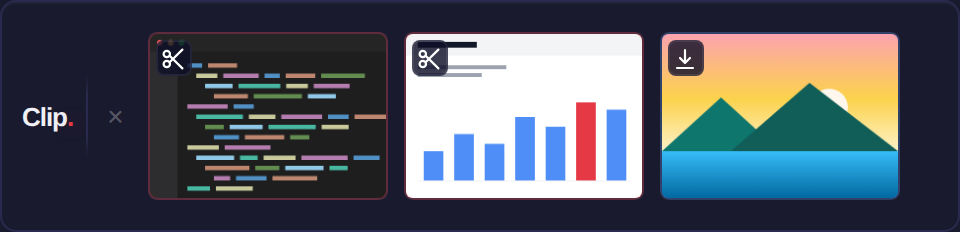 The Clip tray - rendered from the real app UI
Key facts
| Product name | Clip |
|---|---|
| Developer | BitSoft (BIT-SOFT TECHNOLOGY LTD) |
| Platform | Windows 10 / 11 (64-bit) |
| Current version | 1.0.1 |
| Price | £14.99 Standard · £22.99 Personal (2 devices) · £29.99 Professional (3 devices) - one-time purchase, all v1.x updates included |
| Release date | 2026 |
| Code signing | EV certificate (GlobalSign) - verified publisher: Bit-Soft Technology Ltd |
| Distribution | Direct download via Lemon Squeezy |
| Technology | Electron, Node.js, Chokidar |
| Website | clip.bit-soft.co.uk |
| Company site | bit-soft.co.uk |
Press contact
Writing about Clip?
For review copies, interviews, and press enquiries. Response within 1 business day - review copies (licence key) available on request.